How Track Overall ROI
This training will show you how to track overall ROI from all marketing activities with the Forever Booked program.
To track ROI for individual META ads, please visit the Ad Performance & Optimization module of the META Ads Training.
Marketing: Investment VS Expense
Marketing should be viewed as an investment rather than an expense.
Expenses are meant to be reduced. Investments are meant to be continually increased (IF) they are delivering a positive return.
The issue is that it can be difficult to match marketing dollars with their return. As a result, most clinics see marketing as an expense to control, not an investment to grow.
This guide shows you how to track your returns from Forever Booked so can confidently invest in marketing to grow your clinic.
Let's dive in!
How To Track Marketing Metrics
Follow these 2 steps below to track your Forever Booked marketing metrics:
Step 1: Record Appointment Outcomes Daily
Using the "Track Leads" tab in your software, you can record the outcome of each appointment generated through Forever Booked.
Best practices:
Always track appointment outcomes daily. Do not wait for the end of the month or even the end of the week. This makes it difficult to go back and remember all the appointments.
Always record the TOTAL sale value, even if the cash was not all collected upfront. For example, if the total package value is $1000 and they paid $500 upfront, record “$1000” for "Opportunity Value"
Always mark the opportunity as “WON” when you make a sale. If it is not marked as “WON”, the sale will not transfer over to the reporting tab.
Step 2: Update ROI Tracking Sheet Monthly
Our program includes a simple monthly ROI tracking spreadsheet to record revenue and expenses related to Forever Booked.
To access this spreadsheet, go to your software and click on Resources -> "Annual Plan & ROI Tracker".
You can also make a brand new copy of the document by accessing the template HERE.
At the end of each month, update your ROI Tracking Sheet with the following metrics:
Ad Spend: How much total you spent on ads for the month.
FBKD Fees: How much total you spent on Forever Booked for the month.
FBKD Revenue: The total revenue generated through Forever Booked for the month.
How To Calculate FBKD Revenue:
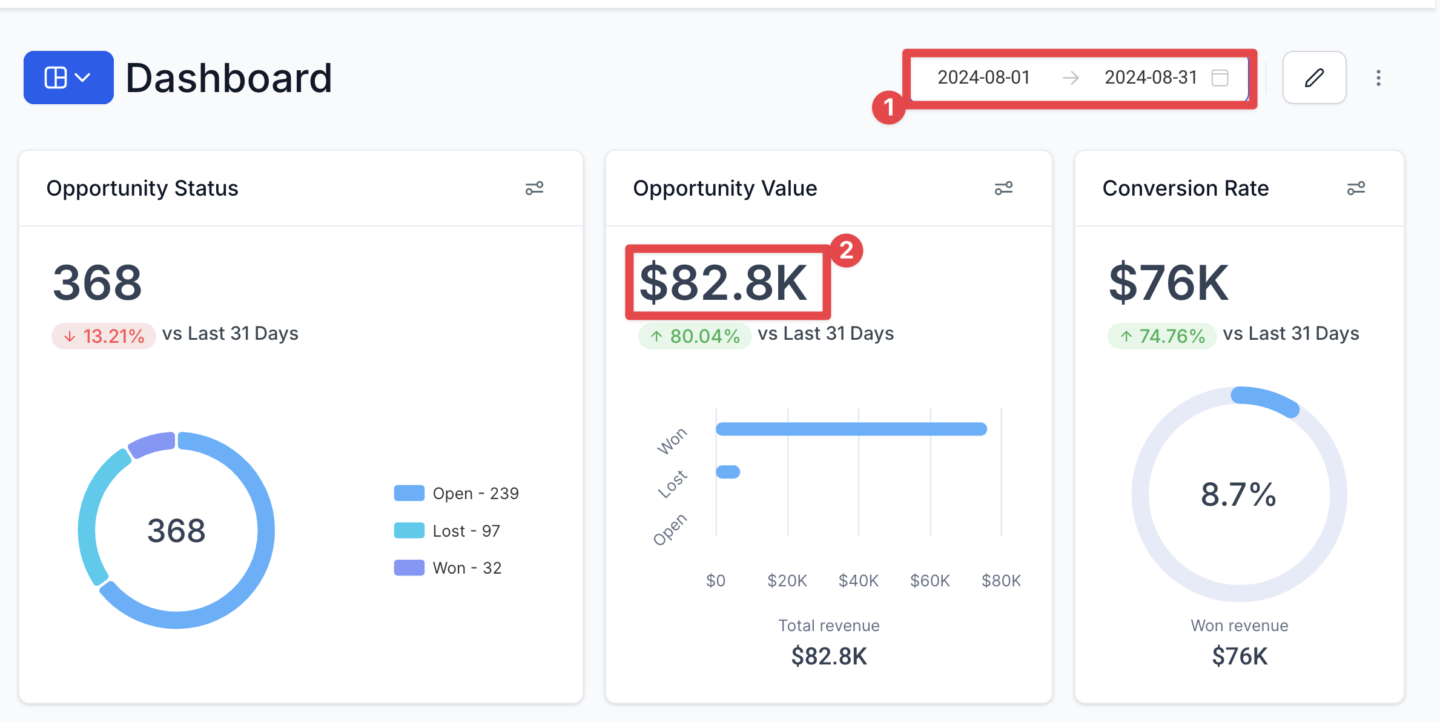
Assuming you have followed Step 1 correctly, your Forever Booked revenue will be calculated in the Reporting > Track Results tab of your software.Simply set the date range for the month you are reporting for and your sales for the month will be shown under "Opportunity Value"
New Patients: How many new patients acquired through Forever Booked for the month.
New Patient LTGP: This is how much the average new client goes on to spend with you over their lifetime, minus your fulfillment costs. Follow How To Calculate LTGP training for instructions on calculating New Patient LTGP.
Did this answer your question?
Thanks for your feedback!