Add Case Studies To Instagram
Adding case studies to your Instagram is a simple and effective way to showcase your results on social media.
Potential clients will see them before visiting your clinic, helping to build trust and interest. Plus, it makes sharing case studies in person effortless—just open your phone and show clients your Instagram page.
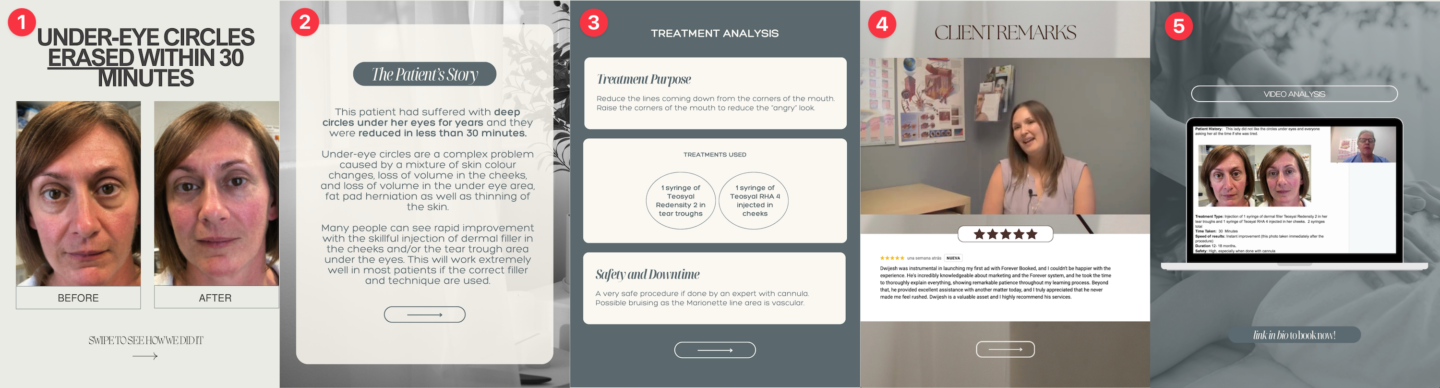
The best format for this is an Instagram carousel. See example below:
Carousel Post Elements
An effective carousel post contains the following elements:
B\&A photo with headline: Can add multiple slides for different angles.
Patient story: Gives more content to the B\&A photo.
Analysis: Explains the actual treatments given and how you were able to achieve the transformation.
Client Remarks: Contains a screenshot of Google review and/or client interview/testimonial.
Video Analysis: Optional video analysis which can be created with a screen share software like Loom.
How To Create Carousel Posts
Step 1: Duplicate & Edit Canva Template
The easiest way to create your posts is to use our provided templates.
Click on the links below to access our Canva templates.
NOTE: These are templates and can't be edited directly. Follow our quick Canva training for instructions on how to make copies of the templates and edit them.
Step 2: Download Edited Files
Make sure you download images and video slides as separate files.
Step 3: Post To Instagram
Post to Instagram using the carousel post option.
For the caption, you can edit the template below:
Instagram Caption Template:
✨ [Case Study Headline] ✨
[Insert client story here]
🎯 Purpose:
💉 Treatments:
⏳ Time:
⚡ Results:
✔️ Safety:
✨ Ready for a subtle, confidence-boosting refresh? DM us to book your consultation! 💌
Did this answer your question?
Thanks for your feedback!